xxx999 App — Play Anywhere on Your Phone
The xxx999 app brings the full casino to your Android phone. Slots, live tables, fishing games and more — all in one 58 MB install. Free to download, works on Android 8.0+.
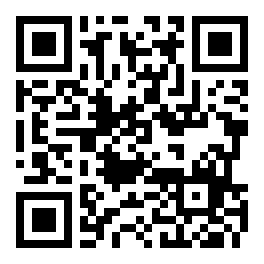
Scan with your phone camera to open the download link directly — no typing required.
- 18+
- SSL Encrypted
- 24/7 Support
- bKash & Nagad
Version Details & System Requirements
Everything you need to know before installing the xxx999 app on your phone.
| App Version | 3.2.8 |
|---|---|
| File Name | xxx999.apk |
| File Size | 58 MB — fits on most budget phones |
| Minimum Android | Android 8.0 (Oreo) or later |
| Last Updated | 9 November 2026 |
| Price | Free — no charge to download or install |
| Languages | English & Bangla |
| Platform | Android (APK sideload). iOS users can use browser PWA. |
Direct Download
The APK is served directly from xxx999 servers. You do not need any third-party app store. Tap the button, allow the download in your browser, then follow the install steps below.
Download xxx999.apk- Games Available
- 5,000+
- Min. Deposit
- ৳150
- Withdrawal Time
- ~16 min
Install the xxx999 APK on Android
Five steps from download to your first spin — takes under three minutes on most phones.
-
1
Allow installs from unknown sources
Go to Settings → Apps → Special App Access → Install Unknown Apps. Find your browser (Chrome or the Files app) and toggle Allow from this source to on. This one-time setting lets Android accept APK files from outside the Play Store. You can turn it off again after installation if you prefer.
-
2
Download the APK file
Tap the Download APK button on this page. Your browser will save
xxx999.apk(58 MB) to your phone's Downloads folder. Keep the screen on while it downloads — most connections in Dhaka or Chittagong finish in under 30 seconds on mobile data. -
3
Open the downloaded file
When the download completes, a notification appears at the top of your screen. Tap Open in that notification, or open your Files app, go to Downloads, and tap
xxx999.apkdirectly. Android will show an install prompt — tap Install. The process takes about 10–15 seconds. -
4
Wait for the install to complete
A progress bar fills across the screen. Do not close the installer. Once it finishes, Android shows "App installed". The xxx999 icon appears on your home screen and app drawer. If you see a warning about Play Protect, tap Install Anyway — this is a standard Android notice for sideloaded APKs, not a sign of a problem.
-
5
Log in or register your account
Open the xxx999 app. If you already have an account, tap Log In and enter your phone number and password. New players tap Register — the form takes under two minutes to complete. After that, go to the Cashier tab, choose bKash or Nagad, and deposit ৳150 or more to claim your welcome bonus. See the registration guide for the full walkthrough.
iPhone & Safari Users
Apple does not allow APK installs. Use Safari to add the xxx999 site to your home screen as a web app — it behaves like an app:
-
1Open xxx999.mobi in Safari on your iPhone or iPad.
-
2Tap the Share icon (the box with an upward arrow) at the bottom of Safari.
-
3Scroll down and tap Add to Home Screen. Give it a name and tap Add.
-
4The xxx999 icon now sits on your home screen. Tap it any time to open the site in full-screen mode — no browser address bar visible.
App vs Browser: What Changes?
Both work. Here is what the native app does differently from opening xxx999 in Chrome.
| Feature | xxx999 App | Mobile Browser |
|---|---|---|
| Full game library access | All 5,000+ games | All 5,000+ games |
| Load speed | Faster — cached assets | Depends on cache state |
| Push notifications (bonus alerts) | Yes | Not supported |
| Stay logged in between sessions | Remembers session | Logs out if cookies cleared |
| Fingerprint / Face ID login | Supported on compatible phones | Not available |
| bKash / Nagad deposit | One-tap redirect | Works via browser |
| Live chat support | Built in | Built in |
| Screen rotation lock | App handles it | Depends on phone setting |
| Storage used | 58 MB on device | No install needed |
| Updates | Manual APK re-download | Always latest version |
If you play daily and want bonus notifications, the app is the better choice. Casual players who only log in a few times a week will find the browser version just as comfortable.
What You Can Play Inside the App
The xxx999 app carries the same library as the full site — here are the main categories you will find.
Slots


Thousands of slots from PG Soft, Pragmatic Play, CQ9 and more. Titles like Jungle Delight (RTP 96.9%), Coin (97.4%) and Piggy Gold (97.6%) load in seconds. Minimum bet ৳1 on most games — good for short sessions on mobile data.
Live Casino Tables
Real dealers streamed to your phone in HD. Play Baccarat, Roulette, Blackjack (including Double Exposure from Pragmatic Play) and game-show titles. Ezugi and Sexy Gaming tables run 24 hours. The app handles the video stream smoothly on a standard 4G connection — no buffering on most networks in Dhaka.
Fishing Games
Fishing games are touchscreen-native — the xxx999 app makes them feel exactly right on a phone. Fire cannons, pick targets and collect multipliers in Bingo Fishing (PG Soft, RTP 97%), Pirate Fishing (Ezugi) and Relax Fishing (Sexy Gaming). These are some of the most-played titles among Bangladesh players on the platform.
Sports Betting
Bet on cricket — Bangladesh Premier League, ICC T20 World Cup, ODI series — plus football, kabaddi and more. Live in-play markets update in real time inside the app. Place a bet on the BPL while watching the match, then switch straight to slots between overs. All in one screen, no browser tabs needed.
Crash & Fast Games
Crash-style games suit the short-session mobile style. Watch the multiplier climb and cash out before the crash — a whole round lasts 20–60 seconds. Also available: instant lottery draws like Lucky Dice (FA Chai, RTP 95.4%) and quick card games. Minimum stake ৳2, so your balance lasts a decent session.
Cashier & Payments
Deposit and withdraw without leaving the app. Tap the Cashier icon, pick bKash, Nagad, Rocket or Upay, and enter the amount. Minimum deposit ৳150. Deposits arrive in roughly 2 minutes. Withdrawals of ৳1,300 or more process in about 16 minutes once KYC is verified. You can track the status of every transaction in the app's history tab.
Not registered yet? Create a free account first — the app works only with a valid xxx999 login. If you already have an account, go straight to Log In.
Permissions the App Requests & Why
The xxx999 app only asks for what it actually needs. Here is a plain-language breakdown.
Push Notifications
The app asks permission to send notifications so it can alert you about reload bonuses, live tournament starts and deposit confirmations. You can deny this permission and the app still works — you will just miss time-sensitive offers. To adjust, go to your phone's Settings → Apps → xxx999 → Notifications.
Camera (KYC Only)
Camera access is requested only when you go through the KYC identity check — required before your first withdrawal. The app uses the camera to photograph your National ID Card (NID), Passport or Driving Licence. No camera data is stored locally; images go directly to the verification team and are deleted after review (within 12 hours).
SSL & Data in Transit
All communication between your phone and xxx999 servers is encrypted with TLS 1.3. Your account password is hashed server-side — the app never stores it in plain text on your device. If you use fingerprint login, the biometric data never leaves your phone; the app only receives a hardware-level authentication result from Android.
No Contacts, Location or Files
The xxx999 app does not request access to your contacts, location, gallery or file storage. The only storage permission it needs is to save the initial APK cache — this is cleared automatically after install. If any version of the app asks for contacts or location, do not install it; you may have downloaded a fake file from a third-party site.
Fix Common Installation Problems
Most issues come down to one of five causes. Check the table before contacting support.
| Problem | Likely Cause | How to Fix It |
|---|---|---|
| "Install blocked" message | Unknown sources permission is off for your browser or file manager | Go to Settings → Apps → Special App Access → Install Unknown Apps. Find Chrome (or whichever app you used to download) and enable Allow from this source. Then tap the APK file again to retry the install. |
| "App not installed" error after tapping Install | An older version of the xxx999 app is already on the phone, or the downloaded file is incomplete | Uninstall the existing xxx999 app first (long-press the icon → Uninstall), then re-download the APK fresh from this page. Make sure the file is 58 MB before opening — a smaller file means the download was cut off mid-way. |
| Download stops at a percentage | Weak mobile data or Wi-Fi signal dropped during download | Switch to a stronger connection — move closer to your Wi-Fi router, or switch between mobile data and Wi-Fi. Delete the partial file from your Downloads folder, then tap the Download APK button again. The file is 58 MB, so a stable connection for 30–60 seconds is all you need. |
| App installs but crashes on open | Android version below 8.0, or low available storage | Check your Android version under Settings → About Phone → Software Information. The xxx999 app requires Android 8.0 or later. Also confirm you have at least 150 MB of free internal storage. If storage is low, delete unused apps or photos before installing. Restart the phone after clearing space, then try opening the app again. |
| Play Protect warning screen | Google Play Protect flags all sideloaded APKs that are not from the Play Store — this is normal behavior, not a virus alert | Tap More details on the warning screen, then tap Install anyway. This warning appears for every APK installed outside the Play Store. If you downloaded from xxx999.mobi directly, the file is genuine. Never tap "Install anyway" for APKs from unknown third-party sites. |
Still stuck after trying the steps above? Open Live Chat inside your xxx999 account (or on the website) — the support team is available 24/7 and can walk you through the install over chat.
Questions Players Ask About the App
Answers to the most common queries before and after installing the xxx999 app.
Is the xxx999 APK file safe to install?
Yes, as long as you download it from this page (xxx999.mobi/xxx999-app/). The APK is built and signed by xxx999 directly — it is not repackaged by any third party. The file does not ask for contacts, location or file-storage access. If you find a copy of the xxx999 APK on a Telegram channel or any other website, do not install it. Those files are not verified and may have been modified. Always come back to this page for the official download link.
My phone says "Parse error" when I try to install. What does that mean?
A parse error usually means the APK file did not download completely — the file on your phone is smaller than 58 MB. Delete the file from your Downloads folder, check that your internet connection is stable, then tap the Download APK button on this page again. Wait for the full 58 MB to arrive before tapping the file. If the error continues, try switching from mobile data to Wi-Fi (or the other way around) and downloading once more.
How do I update the xxx999 app when a new version is released?
The app does not update itself automatically like a Play Store app. When a new version is available, xxx999 will post a notice on the login screen and may send a push notification. To update, come back to this page, download the new APK, and install it over the existing version — you do not need to uninstall first. Your account, balance and game history are stored server-side, so nothing is lost during an update. The current version is 3.2.8, last updated 9 November 2026.
Can I use the app on two phones at the same time?
Your xxx999 account can be installed on more than one device, but only one active session is allowed at a time. If you log in on a second phone, the first session will be ended automatically. This is a security measure to protect your account. If you share a phone with a family member, each person needs their own separate account — sharing one account between two players is against the terms and can result in a withdrawal hold.
Does the app work on a 3G connection, or does it need 4G?
Slots, crash games and the cashier work fine on a 3G connection. Live casino streaming (HD video from the dealer's table) needs at least a stable 4G signal to avoid buffering. If you are on 3G and want live tables, switch to lower video quality in the game settings — most live providers let you drop to 480p, which works on slower connections. For bKash and Nagad deposits, even 3G is sufficient since the transaction itself involves no video.
I forgot my password. Can I reset it inside the app?
Yes. On the app login screen, tap Forgot Password below the password field. Enter the mobile number you registered with and tap Send OTP. You will receive a one-time code by SMS. Enter the code, then set a new password. The whole process takes about two minutes. If your registered number is no longer active, contact 24/7 Live Chat with your account username and a photo of your NID — the support team can verify your identity and reset access manually.
Will installing the xxx999 app affect my phone's performance or battery?
The app itself uses about 58 MB of storage and is comparable to other entertainment apps in terms of CPU and battery use. Live casino streams and high-frame-rate slots will warm up a mid-range phone after 30–40 minutes of continuous play — this is normal. If battery drain is a concern, lower the in-game graphic quality and turn off the "auto-spin" feature between sessions. Closing the app fully (removing it from recent apps) rather than minimising it also saves background battery use.